
.png)



Real-time crisis intervention, built into the browser. Silent, secure and always there.
1.9m+
people protected every week
110K+
harmful searches intercepted to date
15+
high-risk categories covered
INTRODUCTION
An invisible guardian for every desktop browser
People who turn to a search engine in crisis are at their most vulnerable. In that moment, a few words on a screen can be the difference between despair and hope.
Ripple BrowserShield, installed directly in the desktop browser (Chrome, Edge, Safari), calmly intervenes by signposting them to the right support at exactly the right time.
Our safeguarding tool doesn’t collect personal data or need ongoing management. It’s there to complement your existing wellbeing and safeguarding provision.
WHO IS IT FOR
Easy to install. Available to everyone.
BrowserShield is available on subscription for businesses and public sector organisations – this helps to keep it free for individuals, parents, schools, colleges, universities and charities.
FREE TO INSTALL
For families, educational institutions & registered charities
Install BrowserShield in minutes for free. No contract, no payment details, no catch. Simply install the browser extension on any laptop or desktop device and start protecting the people in your care.

Individuals, parents & guardians
Schools, colleges & universities
Registered charities
SUBSCRIPTION
For businesses, public sector organisations & local authorities
Protect every managed device across your organisation with BrowserShield subscription – priced per machine, with discounts for public sector bodies. Your subscription also helps fund free access for schools, families and charities.

Private & listed businesses
Local authority, NHS & public sector bodies
Other organisations
HOW IT WORKS
Three steps that can save a life
Unlike network-level tools that can be bypassed or go unnoticed, BrowserShield detects harmful search engine queries and web page visits.
Step 1
Protection
Once installed, BrowserShield monitors search engine queries and web page visits across all supported browsers. When a user types a harmful term or navigates to a flagged site, BrowserShield responds instantly. No delays. No missed moments.
Step 2
Intervention
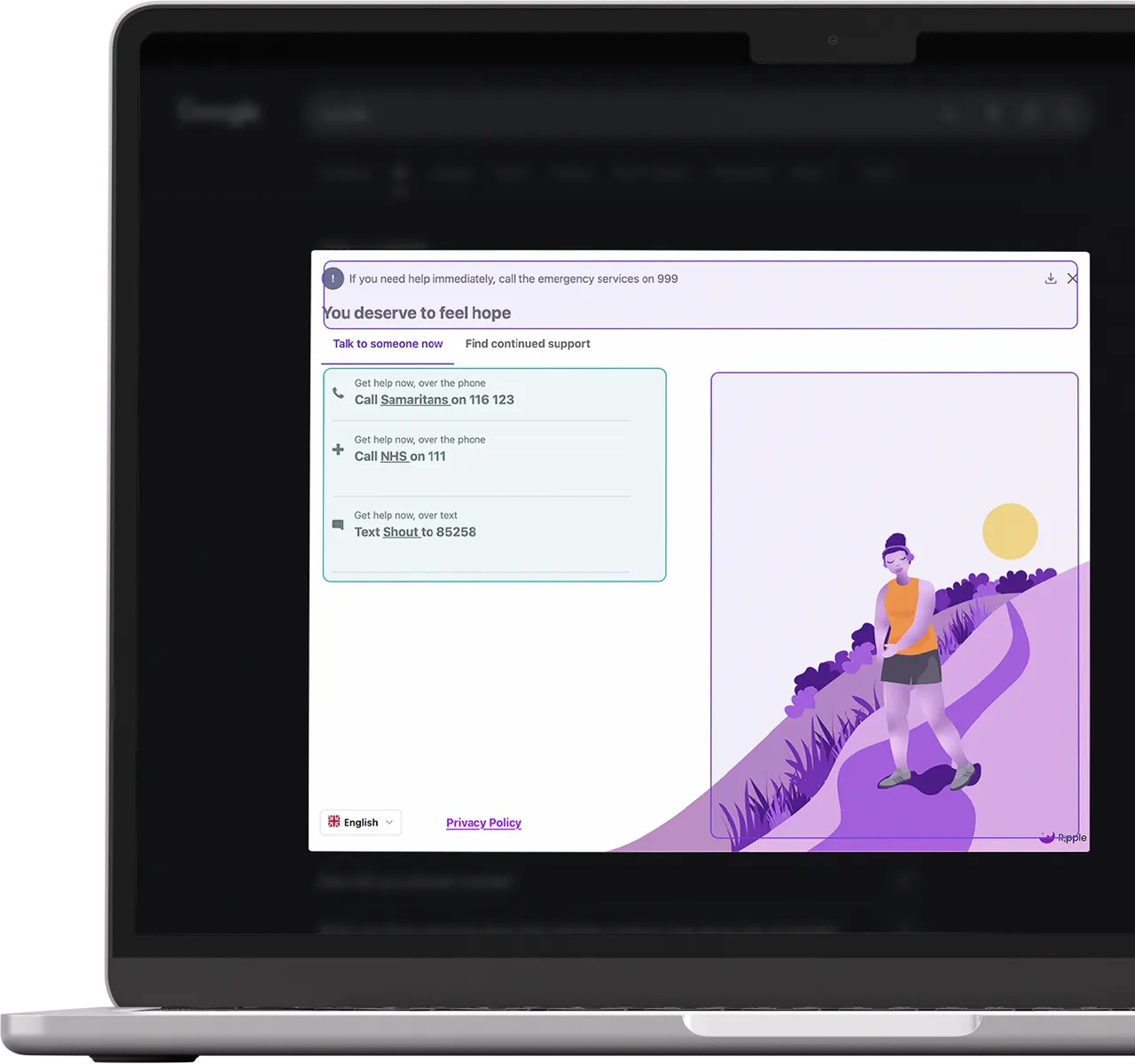
A calmly presented, non-judgemental message appears on screen. Designed in consultation with mental health clinicians and people with lived experience, the intervention screen offers a message of hope and support pathways.
Step 3
Support
Support options include 24/7 helplines and local mental health resources. They cover both immediate crisis help and longer-term services, giving people the best possible chance of finding the right help for them.
KEY BENEFITS
Why organisations choose


Works where people are most vulnerable
Harmful searches happen on devices at work, at home and on the move. BrowserShield provides protection wherever people use their laptop or desktop device, not limited to a specific location.

Invisible until it’s needed
BrowserShield works silently in the background, without disrupting everyday work or device usage. There are no pop-ups or notifications unless an intervention is triggered.

Privacy by design
All detection logic runs locally on the device. Ripple technology can’t see someone’s browsing activity or collect, store or transmit personal information.

Certified & trusted
ISO 27001 and ISO 9001 certified, Cyber Essentials accredited and independently penetration tested. Over 700 organisations trust Ripple technology, including NHS trusts, universities and FTSE-listed companies.

Quick to install. Easy to maintain
Deploy via GPO, Microsoft Intune, JAMF or any MDM platform in as little as 10 minutes. BrowserShield automatically updates its keyword and website library every 24 hours.

Complements what you already have
BrowserShield is a last-line crisis intervention tool, not a wellness platform. It works alongside your EAP, Mental Health First Aider network and wellbeing provisions to create a true safety net.
COVERAGE
What BrowserShield detects
BrowserShield monitors for harmful search terms and content associated with the following categories:
Category
Availability
Self-harm & suicide
All regions
Alcohol misuse
UK / rolling out globally
Autism
UK / rolling out globally
Bereavement
UK / rolling out globally
Baby loss & infertility
UK / rolling out globally
Civilian adaption
UK / rolling out globally
Construction
UK / rolling out globally
Divorce & separation
UK / rolling out globally
Category
Availability
Domestic abuse
UK / rolling out globally
Drug misuse
UK / rolling out globally
Eating disorders
UK / rolling out globally
Financial struggles
UK / rolling out globally
Gambling addiction
UK / rolling out globally
Grooming & sexual exploitation
UK / rolling out globally
LGBTQIA+
UK / rolling out globally
Pet loss
UK / rolling out globally
Category
Availability
Self-harm & suicide
All regions
Alcohol misuse
UK / rolling out globally
Autism
UK / rolling out globally
Bereavement
UK / rolling out globally
Baby loss & infertility
UK / rolling out globally
Civilian adaption
UK / rolling out globally
Construction
UK / rolling out globally
Divorce & separation
UK / rolling out globally
Domestic abuse
UK / rolling out globally
Drug misuse
UK / rolling out globally
Eating disorders
UK / rolling out globally
Financial struggles
UK / rolling out globally
Gambling addiction
UK / rolling out globally
Grooming & sexual exploitation
UK / rolling out globally
LGBTQIA+
UK / rolling out globally
Pet loss
UK / rolling out globally
TECHNICAL SPECIFICATIONS
Built to work with your infrastructure
BrowserShield is designed to integrate smoothly with existing IT environments. It is lightweight, cross-platform and compatible with the most widely used enterprise browser and device management tooling.
Specification
Detail
Keyword & website library updates
Automatic refresh every 24 hours; all processing is local
Performance impact
Negligible; the extension is very lightweight with no measurable resource usage
Data collection
None. No personally identifiable information is collected, stored or transmitted
Security & standards
ISO 27001, ISO 9001, Cyber Essentials, regular penetration testing
Customisation
Support resource options can be tailored to your organisation (conditions apply; see below)
Specification
Detail
Operating systems
Windows, macOS, Linux
Devices
Laptops and desktops
Supported browsers
Google Chrome, Microsoft Edge, Apple Safari, Opera, Mozilla Firefox
Search engines covered
Google, Bing, Yahoo!, Ask, Ecosia, DuckDuckGo, YouTube
Protection level
Search intent detection and access to known harmful web pages
Specification
Detail
Keyword & website library updates
Automatic refresh every 24 hours; all processing is local
Performance impact
Negligible; the extension is very lightweight with no measurable resource usage
Data collection
None. No personally identifiable information is collected, stored or transmitted
Security & standards
ISO 27001, ISO 9001, Cyber Essentials, regular penetration testing
Customisation
Support resource options can be tailored to your organisation (conditions apply; see below)
Operating systems
Windows, macOS, Linux
Devices
Laptops and desktops
Supported browsers
Google Chrome, Microsoft Edge, Apple Safari, Opera, Mozilla Firefox
Search engines covered
Google, Bing, Yahoo!, Ask, Ecosia, DuckDuckGo, YouTube
Protection level
Search intent detection and access to known harmful web pages
DEPLOYMENT
Installing BrowserShield
BrowserShield is deployed as a browser extension on managed machines. Your IT team has three main routes to roll it out, all of which are compatible with standard enterprise tooling.
Route 1
GPO (Group Policy Object)
Force-install the extension across Chrome and Edge via Group Policy (the preferred option for Windows-managed estates). Takes approximately 10 minutes.
Route 2
Browser Management
Use Google Workspace or Microsoft 365 to force-install the extension via your existing browser management controls.
No additional tooling required.
Route 3
MDM Platform
Compatible with Microsoft Intune, JAMF and other third-party MDM platforms. Ideal for mixed-OS environments and remote workforces.
The Ripple For Business team can advise on the best approach for your IT setup and assist with testing, pilot programmes and full organisation-wide rollouts.
PRIVACY AT THE CORE
We don’t collect personal data; we save lives.
Privacy is the cornerstone of BrowserShield. The tool was designed from the ground up to provide crisis intervention without compromising the dignity or anonymity of anyone it protects.
All detection is local
BrowserShield holds its keyword and website library locally on the device and updates it every 24 hours. Searches are never sent to an external server for analysis.
No individual reporting
BrowserShield cannot identify which user or device triggered an intervention. There is no user- or organisational-level reporting, no notification to managers and no flagging of individuals.
CUSTOMISATION
Tailored to your people
BrowserShield’s standard intervention screen is evidence-based. It is tested extensively with mental health clinicians and people with lived experience and optimised for maximum positive impact.
However, if your organisation has specific support services, we can tailor the resources shown on-screen for a one-off fee. For instance, with services more relevant to your workforce, geography or demographic.
What can be customised:
Support services and helplines on the intervention screen
Your internal mental health or EAP contact details
Geographical relevance of resources for multi-site or international organisations
What remains unchanged:

The wording of the message of hope presented to the individual
The visual design, colours and illustrations of the intervention screen
The core functionality and detection logic of the tool
We review customisation requests to make sure all featured services meet our standards for capacity and quality. Please allow lead time when planning your deployment.

Get BrowserShield today
Whether protecting your family at home, a student body on campus or a workforce of thousands, BrowserShield is ready to install.

For Educators, Charities & Families

For Businesses & Public Sector
Not sure which applies to you? Get in touch and we can help.
FREQUENTLY ASKED QUESTIONS
Common questions about BrowserShield
Installing and deploying Ripple
BrowserShield is a browser extension available for free for home use.
You can install it in a minute on your laptop or desktop computer via the Chrome, Edge, Safari, Opera or Firefox extension store. Access the download links and video tutorials here: https://www.ripplesuicideprevention.com/information/install
- BrowserShield is deployed as a browser extension on managed laptops and desktops. There are three primary deployment routes:
• GPO (Group Policy Object): force-install the extension across Chrome and Edge via Group Policy. The most common option for Windows-managed estates. Takes approximately 10 minutes.
• Browser management: use Google Workspace or Microsoft 365 admin controls to push the extension to enrolled browsers.
• MDM platform: compatible with Microsoft Intune, JAMF and other third-party Mobile Device Management tools.Our team can provide technical support through testing, pilot programmes and full rollouts. Once deployed, no further action is required: the extension updates automatically every 24 hours.
- Yes. BrowserShield can be installed on a single machine via the Chrome, Edge, Safari, Opera or Firefox extension store. This is the same process used by individuals installing it for personal use. For managed organisations, deployment via GPO or MDM is more practical for large-scale rollout.
- For individually installed extensions, a user can uninstall BrowserShield. Where BrowserShield has been deployed via GPO or browser management as a force-installed extension, users are typically unable to remove it without administrator permissions. There is no notification sent to Ripple team or to the organisation when an extension is uninstalled.
Reporting and measurement
- BrowserShield does not provide organisational reporting. Because it does not collect personally identifiable information and processes searches locally on the device, it cannot report on activations within your organisation. This is a deliberate design decision to protect user dignity and privacy.
If BrowserShield has never triggered within your organisation, this means your people have not been in crisis on a managed device during that period. That is the best possible outcome.
Managing Ripple products
- Yes. BrowserShield is free for individuals. Any employee can install it on their personal computer, laptop or home device at no cost, and we actively encourage organisations to promote this. This extends protection beyond managed work devices to the home environment, where harmful searches are also common.
Pricing and contracts
- BrowserShield subscriptions for businesses are priced per machine on a monthly basis, billed annually. Pricing scales with volume. Please contact our team for a quote.
Discounts are available for public-sector organisations. Contact us for more information and a quote.
A one-off fee applies for content customisation.
BrowserShield is free for individuals, schools, colleges, sixth forms, universities and registered charities.
How Ripple technology works
- No. BrowserShield is a very lightweight extension with no measurable impact on device performance. It does not transmit data in real time, which also means it adds no network overhead.